The budget prebuilt gaming PC I’d buy in 2026 is the iBUYPOWER RTX 5060 Series Desktop, the right machine for most people who game at 1080p today and want room to move to 1440p later. Picture the desk: a new tower beside a 144Hz monitor, a game three hours in, and the PC shuts off because a no-name power supply gave up. That’s the failure this page is built to help you avoid.
Is a budget prebuilt worth it over building your own? For most buyers, yes, provided you read past the GPU badge. Every machine here runs the same GeForce RTX 5060, which NVIDIA lists with 8 GB of GDDR7 memory and 145 W of total graphics power. The frames are near enough identical. The parts around the card are not.
In this guide
Which Budget Prebuilt Gaming PC Should You Buy?
Five buyers, five answers. Every pick is collected in my Amazon storefront if you’d rather compare the listings side by side.
- If you want the one with the fewest corners cut, buy the iBUYPOWER RTX 5060 Series Desktop.
- If you plan to add parts yourself and want plain hardware, buy the Skytech Shadow / Archangel Series.
- If the budget is firm and you still want a named power supply, buy the ZOTAC GAMING MEK 5060.
- If you want one big brand handling the warranty and can pay for it, buy the ASUS ROG G700 (2025).
- If you want an Intel platform with DDR5 at the entry tier, buy the CyberPowerPC Gamer Xtreme VR (RTX 5060).
Newsletter
One email a week, and only when there is something in it
Every guide I published or rewrote that week, up to six of them, each with a line on who it is for and what it settles. No prices, no deals, nothing else.
It goes out on Thursday mornings. In a week when nothing new went up, nothing is sent.
Your address goes to MailerLite, who deliver the email, and nowhere else. Every email has an unsubscribe link. The email ends with one link to my Amazon storefront, and as an Amazon Associate I earn from qualifying purchases. Privacy policy.
The Three Things That Decide This Purchase
None of the three appears in a product title. All of them show up in month fourteen, when the first upgrade itch arrives or the first part misbehaves.
Memory layout and memory type
Two sticks beat one. A PC running its memory in dual channel (two matched sticks working as a pair) feels smoother in CPU-heavy games than the same PC with a single stick, and some budget configurations ship one stick without saying so. ZOTAC states dual-channel on its own page. On the others, check the listing photos.
Type matters too. DDR5 boards, such as AMD’s B650 and Intel’s B760, sit on platforms that still receive new processors or at least newer memory. DDR4 boards like B550 are the end of their line. A DDR4 build isn’t slow today. It’s a platform with no next step.
A power supply with a wattage and a rating
NVIDIA’s required system power for the RTX 5060 is 550 W, so none of these PCs needs a huge unit. What it needs is one the builder is willing to describe. iBUYPOWER lists a 600W 80 PLUS Gold supply on my top pick, and Skytech and ZOTAC both list 650W Gold units.
“80 Plus Gold” is an efficiency rating: less of the power pulled from the wall is wasted as heat. When a listing gives no wattage and no rating at all, treat that silence as the answer. My PSU calculator shows how much headroom a future graphics card would want.
The CPU platform, not the CPU tier
Paying extra to go from a Ryzen 5 to a Ryzen 7 buys little in an RTX 5060 PC, because the graphics card runs out of breath long before the processor does. What’s worth paying for is the socket underneath. An AM5 board gives you an upgrade path. An AM4 board gives you a full stop.
Two things I wouldn’t pay extra for at all: a second terabyte of factory storage and a glass front panel. Adding your own NVMe drive later is a ten-minute job with one screw. A sealed glass front looks good in the listing photo and starves the fans behind it.
In Daily Use
Here’s how each one fits a real desk, and what you give up by choosing it.
1080p now, 1440p next year
This is the iBUYPOWER’s home ground. iBUYPOWER’s own page for the Slate configuration (model SBA7N5602) lists a Ryzen 7 7700, 32GB of DDR5-5200MHz memory, a 1TB NVMe drive, a B650 WiFi board and that 600W 80 PLUS Gold supply in a mesh-front Slate 9 case. It’s the only list here with DDR5, 32GB and a rated supply all at once.
At 1080p the RTX 5060 has room to spare in most games. At 1440p, expect high settings with upscaling switched on (DLSS renders the game at a lower resolution and sharpens it back up), not ultra with ray tracing. That’s the card talking, and it’s true of all five machines.
What owners grumble about is the arrival, not the hardware: boxes that took a knock in transit, and preinstalled software they removed on day one. Neither would stop me. Both are worth ten minutes of your first evening.
Top Pick
iBUYPOWER RTX 5060 Series Desktop

Most buyers who game at 1080p now and want 1440p headroom later
Key specs
- NVIDIA GeForce RTX 5060 8GB
- AMD Ryzen 7 7700 on a B650 WiFi board
- 32GB DDR5-5200MHz
- 1TB NVMe SSD
- 600W 80 PLUS Gold power supply (manufacturer)
Reasons to buy
- 32GB of DDR5 where rivals ship 16GB
- Power supply wattage and rating are stated by the maker
- AM5 platform leaves a processor upgrade path
Reasons to avoid
- Owners report shipping knocks, so check the GPU is seated before first boot
- Preinstalled software owners remove on day one
Full specs and support: www.ibuypower.com
A plain tower you intend to open
Skytech spends on the parts and stops. Its Archangel 4 page (SKU ST-ARCH4-2044-W-AL) lists a Ryzen 7 5700, an RTX 5060, 32GB of DDR4 3200MHz memory, a 1TB NVMe drive, a B550 board, 4 fans and a 650W Gold supply. Skytech sells the same case with a Ryzen 5 7600, 32GB of DDR5 6000MHz and a B650 board, and that’s the version I’d hunt for.
The catch is the family name. Shadow and Archangel cover many builds that look identical in thumbnails, and the memory generation changes between them. Read the bullet list twice.
Get the right one and it’s the easiest PC here to live with long term. The case takes standard parts, the supply is rated, and there’s nothing proprietary between you and a new graphics card in three years.
Best Value
Skytech Shadow / Archangel Series

Buyers who will check the SKU and add parts themselves later
Key specs
- NVIDIA GeForce RTX 5060
- AMD Ryzen 7 5700 on B550, or Ryzen 5 7600 on B650
- 32GB DDR4 3200MHz, or 32GB DDR5 6000MHz
- 1TB NVMe SSD
- 650W Gold power supply (manufacturer)
Reasons to buy
- 32GB of memory and a rated 650W Gold supply
- Standard parts, so upgrades are simple
- A DDR5 version exists in the same case
Reasons to avoid
- DDR4 and DDR5 builds share one family name
- Stock fan settings are noisy until adjusted
A firm budget and a 1080p monitor
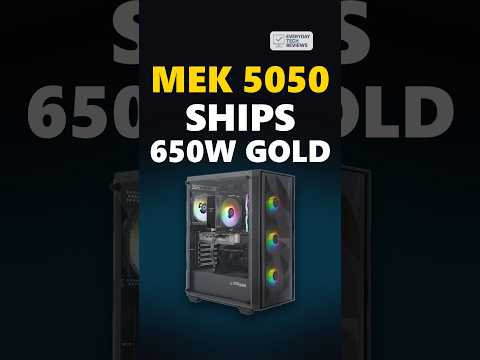
The ZOTAC GAMING MEK 5060 replaces the MSI Aegis R2 on this page, because Amazon no longer stocks the Aegis in its plain RTX 5060 form. ZOTAC makes the graphics card itself, and its store lists the whole PC plainly: a Ryzen 5 5500, dual-channel 16GB DDR4 3200 memory, a 1TB NVMe M.2 SSD, 4x 120mm fans and a 650 watt 80+ Gold power supply.
It also splits the warranty in a useful way: 1-year cover on the system and a 3-year warranty on the graphics card. The trade is the platform. A Ryzen 5 5500 on B550 with DDR4 is the oldest foundation in this group, so buy it to play on, not to build on.
For a 1080p screen you plan to keep, that’s a trade I’d take. The card is the same one the dearer towers use, and the supply is better documented than most of them manage.
Also Worth a Look
ZOTAC GAMING MEK 5060

Firm budgets with a 1080p monitor that is staying put
Key specs
- ZOTAC GAMING GeForce RTX 5060 8GB GDDR7
- AMD Ryzen 5 5500 on B550
- Dual-channel 16GB DDR4 3200
- 1TB NVMe M.2 SSD
- 650 watt 80+ Gold power supply (manufacturer)
Reasons to buy
- Power supply is named and rated on the maker's page
- 3-year warranty on the graphics card
- Dual-channel memory stated by the maker
Reasons to avoid
- AM4 platform with DDR4 has no processor upgrade path
- 16GB of memory, where the top pick has 32GB
One call to one company when something breaks
The ASUS ROG G700 (2025) is the expensive way to buy the same frames. The G700TF-DS764 configuration pairs a Core Ultra 7 265F with the RTX 5060, 16GB DDR5 and a 1TB PCIe 4.0 SSD in a 58L tower. You’re paying for a single manufacturer behind the board, the card and the warranty.
I’d only pay that premium if arguing with a small builder over a dead part fills you with dread. It ships with 16GB where the iBUYPOWER ships 32GB, and that stings at this tier.
There’s a quieter argument for it. That 58L case is roomy, and the Core Ultra 7 265F is the strongest processor on this page. If your PC also edits video or compiles code between matches, the ASUS earns back some of its price.
Upgrade Pick
ASUS ROG G700 (2025)

Buyers who want one big brand behind every part and the warranty
Key specs
- NVIDIA GeForce RTX 5060
- Intel Core Ultra 7 265F
- 16GB DDR5
- 1TB PCIe 4.0 SSD
- 58L tower (G700TF-DS764)
Reasons to buy
- One manufacturer behind the board, the card and the warranty
- Strongest processor of the five for work between games
- Roomy 58L case
Reasons to avoid
- Costs far more than rivals with the same graphics card
- Ships with 16GB of memory at a premium price
- Preinstalled ASUS software annoys owners
An Intel DDR5 platform at the entry tier
CyberPowerPC’s Gamer Xtreme VR (model GXiVR8060A40) is listed with a Core i5-13400F, a B760 chipset, 16GB DDR5, a 1TB PCIe 4.0 NVMe SSD, and a 1 year parts and labor warranty with free lifetime tech support. For Fortnite, Valorant and most big releases at 1080p high settings, that list does the job.
The listing doesn’t name the power supply’s wattage. That’s the part I’d budget to check, and possibly replace, before any graphics card upgrade.
Its strength is the memory type. DDR5 on a B760 board means the 16GB it ships with can become 32GB with a matching pair later, and the sticks you buy will carry over to a newer build.
Budget Pick
CyberPowerPC Gamer Xtreme VR (RTX 5060)

Entry-tier buyers who want DDR5 on an Intel board
Key specs
- NVIDIA GeForce RTX 5060 8GB
- Intel Core i5-13400F on B760
- 16GB DDR5
- 1TB PCIe 4.0 NVMe SSD
- 1 year parts and labor warranty
Reasons to buy
- DDR5 memory that carries over to a later build
- Plenty for 1080p at high settings
- Free lifetime tech support
Reasons to avoid
- Power supply wattage is not stated on the listing
- 16GB of memory
- Owners report shipping-related problems
Versus the Obvious Alternatives
| Model | Listed configuration | Power supply | Best for | Watch out for |
|---|---|---|---|---|
| iBUYPOWER RTX 5060 Series Desktop | Ryzen 7 7700, 32GB DDR5-5200MHz, 1TB NVMe, B650 | 600W 80 PLUS Gold | Most buyers, 1080p to 1440p | Shipping knocks, preinstalled software |
| Skytech Shadow / Archangel Series | Ryzen 7 5700, 32GB DDR4 3200MHz, 1TB NVMe, B550 | 650W Gold | Upgraders who want plain parts | DDR4 and DDR5 builds share one name |
| ZOTAC GAMING MEK 5060 | Ryzen 5 5500, 16GB DDR4 3200, 1TB NVMe, B550 | 650 watt 80+ Gold | Firm budgets, 1080p | Oldest platform here |
| ASUS ROG G700 (2025) | Core Ultra 7 265F, 16GB DDR5, 1TB PCIe 4.0 SSD | Check the exact configuration | One-brand warranty, work plus play | Costs far more for the same card |
| CyberPowerPC Gamer Xtreme VR (RTX 5060) | Core i5-13400F, 16GB DDR5, 1TB PCIe 4.0 NVMe, B760 | Not stated on the listing | DDR5 at the entry tier | Unnamed supply, 16GB |
Against the Skytech Shadow / Archangel Series, the iBUYPOWER wins on certainty. Skytech’s best configuration matches it, and its most common one is a DDR4 build. If you’ll verify the SKU, Skytech is the smarter spend. If you won’t, it isn’t.
The ZOTAC GAMING MEK 5060 gives up platform age and matches the leaders on power supply. For a 1080p monitor you’re keeping, that’s a fair trade. For anyone eyeing a processor upgrade, it’s the wrong one.
Next to the ASUS ROG G700 (2025), my top pick has twice the memory. ASUS answers with a 58L case and one brand name on everything. Frames per second are a wash.
Closest on platform is the CyberPowerPC Gamer Xtreme VR (RTX 5060), with DDR5 and a B760 board, but it has half the memory and an unnamed supply. If you’re weighing a tier up instead, my guide to the best prebuilt gaming PC under $1500 covers faster cards, and the best gaming PC under $1000 covers the tier below.
Then there’s the alternative nobody sells: building it yourself. If you enjoy the process and have a free weekend, the same money often buys a better case and supply. If you want a warranty on the whole machine and a Windows install that already works, a prebuilt is the honest choice, and nobody should talk you out of it.
The Complaints, Ranked
These are the complaints outlets report about budget prebuilts as a class, roughly in the order they matter, with who each one hits.
- Shipping damage. A graphics card or memory stick shaken loose in transit. It can hit any buyer of any brand, and it’s a five-minute fix if you look before first boot.
- Mystery power supplies. These hit upgraders hardest. Tech Guided’s advice before any graphics card swap is to verify the supply’s wattage, connectors and physical clearance.
- Listings that change under one name. Skytech and CyberPowerPC shoppers feel this most, because one family name covers many builds. The model number is the only thing that pins a configuration down.
- Preinstalled software. Big-brand buyers get the most of it. It’s an annoyance, not a defect, and it uninstalls.
- Fan noise at stock settings. This bothers anyone with the tower on the desk instead of under it. A gentler fan curve in the BIOS usually settles it.
Notice what isn’t on the list: frame rates. People rarely return a budget prebuilt gaming PC because the RTX 5060 was too slow for 1080p. They return it because something around the card let them down.
Who It’s For
- Buyers who want to play tonight, with one warranty covering the whole machine.
- 1080p players on 144Hz monitors, and 1440p players happy with high settings and upscaling.
- First-time PC owners who’d rather not choose eight separate parts.
- Parents buying a teenager’s first gaming PC who need a short, safe list.
Who Should Skip It
- Anyone set on 1440p ultra with ray tracing. Shop a graphics tier up, not a brand across.
- Builders who enjoy the process. My 1440p build parts list shows what similar money buys in parts.
- Owners of 4K monitors. An RTX 5060 is the wrong card for that screen.
Pro Tips from Real Owners
- Open the side panel before first boot. Press the graphics card and both memory sticks home, and remove any packing foam.
- Plug the monitor cable into the graphics card, not the motherboard. It’s the classic first-day mistake, and it makes a fast PC look slow.
- Turn on the memory profile (XMP on Intel, EXPO on AMD) in the BIOS. Without it, fast memory runs at its slow default.
- Photograph the power supply label on day one. You’ll want the wattage when upgrade time comes, and the label is hard to read once cables are tied down.
- Update the graphics driver from NVIDIA before judging performance.
How I Evaluated It
My method is research, not testing: this guide is built from the manufacturers’ spec sheets and from published testing and owner feedback reported by named outlets, and it was drafted with AI assistance.
I started from the RTX 5060 lines of the five builders on this page, plus the RTX 5050 and clearance machines sold beside them. Anything whose maker wouldn’t state the memory, the board or the warranty somewhere I could read it came off the list.
Three factors decided the order of every budget prebuilt gaming PC here: memory amount and type, a stated power supply, and the platform under the processor. Gaming speed barely figured, because NVIDIA’s one card sets it for all five.
What I left out, and why. RTX 5050 builds save less than you’d hope and give up real performance at 1440p. Clearance RTX 4060 machines start a generation behind on day one. Refurbished office towers with a graphics card dropped in tend to use proprietary power supplies with no upgrade path. And the MSI Aegis R2 left because its plain RTX 5060 version is no longer stocked.
Three Questions Before You Buy
What Is the Best Gaming PC?
The best gaming PC for most budgets is the one whose spec list hides nothing, and at the RTX 5060 tier that’s the iBUYPOWER RTX 5060 Series Desktop. It pairs the card with 32GB of DDR5 and a rated 600W supply. Spend more only when your monitor asks for it.
Is 8GB of VRAM Still Enough in 2026?
For 1080p, yes. For 1440p it’s workable at high textures with upscaling on. A few recent games push past 8 GB at maximum settings, and when they do you lower one slider instead of buying a new card.
Will I Need a New Power Supply to Upgrade the GPU Later?
Probably not on the iBUYPOWER, Skytech or ZOTAC, whose makers list 600W and 650W Gold units, as long as the new card is a sensible step up. On a listing that names no wattage, assume yes. Check the label, the connectors and the case clearance before ordering a bigger card.
Prefer to tap through? The picks as a Web Story
Buy Once, Buy Right: The Bottom Line
- Tightest budget: the ZOTAC GAMING MEK 5060, for its named 650 watt supply.
- Most people: the iBUYPOWER RTX 5060 Series Desktop, for 32GB of DDR5 and a platform with a future.
- Money for peace of mind: the ASUS ROG G700 (2025), for one brand behind every part.
All five sit together in my Amazon storefront. The budget prebuilt gaming PC I’d put my own money on is the iBUYPOWER.
Sources
- GeForce RTX 5060 Family Graphics Cards | NVIDIA — RTX 5060: 8 GB GDDR7, 145 W total graphics power, 550 W required system power
- iBUYPOWER SBA7N5602 retail support page — Slate SBA7N5602: Ryzen 7 7700, 32GB DDR5-5200MHz, 1TB NVMe, B650 WiFi, 600W 80 PLUS Gold, launch May
- Skytech Archangel 4 Gaming PC, R7 5700, RTX 5060 #2044-W — Archangel 4: 32GB DDR4 3200MHz, B550, 4 fans, 650W Gold, 1-year warranty
- Skytech Archangel 4 Gaming PC, R5 7600, RTX 5060 #1980-W — DDR5 version: Ryzen 5 7600, 32GB DDR5 6000MHz, B650
- ZOTAC GAMING MEK 5060 Gaming PC (ZOTAC US store) — MEK 5060 specs, 650 watt 80+ Gold supply, warranty terms, in stock
- ASUS ROG G700 (2025) Gaming Desktop PC (G700TF-DS764) | SpecPicks — G700TF-DS764: Core Ultra 7 265F, RTX 5060, 16GB DDR5, 1TB PCIe 4.0, 58L
- CyberPowerPC Gamer Xtreme VR Gaming PC (GXiVR8060A40) | SpecPicks — Core i5-13400F, B760, 16GB DDR5, 1TB PCIe 4.0 NVMe, 1 year parts and labor warranty
- Best Prebuilt Gaming PC Under $1,000 in 2026 | Tech Guided — Advice to verify the power supply's wattage, connectors and clearance before a GPU swap
All of my current picks in one place: the Everyday Tech Reviews Amazon storefront.
New to Prime? Start a Prime free trial for fast, free delivery on most of these picks (eligible new members).
Related guides
- Best Power Supply for Gaming PC (2026): 3 Quiet Picks
- Electricity Cost Calculator 2026: What It Actually Costs
- Best Prebuilt Gaming PC Under $1500 in 2026, 3 Top Picks
- Best Gaming PC Under $1000 (2026): The One I’d Buy